Tuesday, August 22, 2017
Restart
Korman, G. (2017). Restart. New York: Scholastic.
Korman has written a wonderful book looking into the world of bullying. He shows the life of Chase Ambrose from before his accident and after his accident. Chase does not remember the Chase from before he fell off his roof, but everyone else at his Middle School does. He discovers things about himself that he is not proud of. Before his accident he was the biggest school bully. He befriends the people he bullied the most without even realizing it. The book allows the reader to see the perspective of all the characters from first person.
This is a great book to read with young people to show them how bullying others can make them feel. The consequences that can develop from what they think is innocent fun, but others do not see that way. I like the twist on how the book makes one see that just because one acts a certain way it does not mean they have to be like that. People can change for the better.
Check out these resources to help with bullying:
Edutopia
NAESP
Stopbullying.gov
Thursday, August 3, 2017
Educational Technology Reflection
Over the summer I have spent a lot of time exploring and engaging with digital technology tools. In this post I am going to reflect on my favorites, least favorites, some that may have given me challenges and which ones I think will benefit students the most.
My favorite tool to explore and use was Animoto. I loved being able to create a book trailer for a book that I read. I posted my creation on Facebook and received so many likes and comments. My friends thought I was a genius. The feeling of accomplishment and praise that I got made me feel like a real producer and contributor. The program itself is really easy to use and create with. I think students will really like using the tool to make visual summaries of books that they have read to share with others.
The podcast tools were the most difficult for me (PodBean, Pod-O-matic and SoundCloud). Trying to decide on what I wanted to create took me some time. Once I decided and got started it was easy, until I wanted to upload my podcasts. I struggled with being able to upload. Just recently I have discovered that the Wi-Fi in my house is not working properly. The upload speed is very slow. I will have to try again once we change out the router. I hope it will work much more quickly. I have several ideas as to how to use the podcasts and QR codes together. Another reason podcasts are my least favorite is because I am not an audio only learner. I really need the visuals. Which is why I really like Infographics. My first podcast I ever made I had to make it into a vodcast - a video plus the audio. I could not just do the audio file it just did not feel right to me. Granted the vodcast is more work, but I like the end product better because I have something visual to help me link what I am hearing. Which helps my brain better process the information. Which I think is why I really like screencasts and plan to really use this tool to help all learners in the library be able to better access information. Screencasts are a great tool to help support teaching mini-lessons in real time - 24/7.
I think the technology tools that allow students to use their learning styles and creativity will be the most powerful. So students will need a variety of tools to use when they want to create and share information with others. As the librarian and technology support on a school campus it is my job to explore and provide the resources that will work for all learners, not just my favorites. Always remembering that every learner is different is so important in education. Just like in collection development I will not have only fantasy and romance books because they are my favorite. I will provide quality resources in as many different genres that are available so all students have access to what fits their interests best.
The key to knowing technology is being able to evaluate it for the pros and cons. Thinking about all learners when evaluating the tool. Then when sharing the information about the tool being objective and transparent with the user so they can select the best tool that fits their learning style and needs.
My favorite tool to explore and use was Animoto. I loved being able to create a book trailer for a book that I read. I posted my creation on Facebook and received so many likes and comments. My friends thought I was a genius. The feeling of accomplishment and praise that I got made me feel like a real producer and contributor. The program itself is really easy to use and create with. I think students will really like using the tool to make visual summaries of books that they have read to share with others.
The podcast tools were the most difficult for me (PodBean, Pod-O-matic and SoundCloud). Trying to decide on what I wanted to create took me some time. Once I decided and got started it was easy, until I wanted to upload my podcasts. I struggled with being able to upload. Just recently I have discovered that the Wi-Fi in my house is not working properly. The upload speed is very slow. I will have to try again once we change out the router. I hope it will work much more quickly. I have several ideas as to how to use the podcasts and QR codes together. Another reason podcasts are my least favorite is because I am not an audio only learner. I really need the visuals. Which is why I really like Infographics. My first podcast I ever made I had to make it into a vodcast - a video plus the audio. I could not just do the audio file it just did not feel right to me. Granted the vodcast is more work, but I like the end product better because I have something visual to help me link what I am hearing. Which helps my brain better process the information. Which I think is why I really like screencasts and plan to really use this tool to help all learners in the library be able to better access information. Screencasts are a great tool to help support teaching mini-lessons in real time - 24/7.
I think the technology tools that allow students to use their learning styles and creativity will be the most powerful. So students will need a variety of tools to use when they want to create and share information with others. As the librarian and technology support on a school campus it is my job to explore and provide the resources that will work for all learners, not just my favorites. Always remembering that every learner is different is so important in education. Just like in collection development I will not have only fantasy and romance books because they are my favorite. I will provide quality resources in as many different genres that are available so all students have access to what fits their interests best.
The key to knowing technology is being able to evaluate it for the pros and cons. Thinking about all learners when evaluating the tool. Then when sharing the information about the tool being objective and transparent with the user so they can select the best tool that fits their learning style and needs.
Thursday, July 27, 2017
TIA 2017
Think Iterate Act
North Texas Technology and Curriculum Conference
Sponsored by Denton ISD
Last week I attended #TIA17. Wow what a great conference for learning about technology and how others are using the tech tools with their teaching. The keynote speakers this year were awesome - Dave Burgess the author of Teach Like a Pirate and Eric Sheninger the Senior Fellow and Thought Leader on Digital Leadership with the International Center for Leadership in Education.
The key points I took away from Dave Burgess were:
- Make Learning a personal experience.
- Draw students into your lessons by using "Hooks" like props, storytelling, images, etc.
- Let kids see the real you! Make engagement personal and be passionate in your teaching.
The key points I took away from Eric Sheninger were:
- Leaders do not ask others to do something unless they are willing to do it themselves.
- Change happens in the classroom so campus leaders need to support and guide teachers in the classroom.
- If we do not get instructional design right then technology will just speed up failure.
- Think about the learning space - change it to meet the learners needs.
- Focus on the "What if..." not the "Yeah but..."
- Build relationships and communicate with students, parents, administrators, stockholders, etc. in the way that they need you to - such as social media, email, phone, webpages. etc...
- Tell and share your story.
I attended 2 days of break out sessions. I can not share everything I learned so I am going to share my top 5.
- Be a Rock Star Librarian and Digital Tools for Student Inquiry - Presented by Nancy Jo Lambert. Student achievement is the #1 point of the library. Invite teachers to come to the librarian every time they are going to use information so you can help them use quality resources. MackinVia is a free resource to use when making pathfinders and gathering resources for classes to use during inquiry projects. Canva is a great resource for making posters, fliers, etc... for the library. A great tip when creating accounts for your library - create a gmail account for the library and link everything to that. So if and when you move to another library the next librarian has access to the social media accounts and other resources.
- If you Give a Kindergartner a Chromebook - Presented by Jamie Morgan. Chromebooks can be used with kindergartners and students who can not read and write. Okay Google is a voice command tool that can be turned on so students can be able to search and type with voice commands. Google Tone can help the teacher send out websites to multiple Chromebooks at one time. Screencastify can be used for verbal accommodations during assessments.
- Creative Storytelling with Adobe Spark - Presented by Claudio Zavala Jr., a free app that can be used on computer, tablets or phones. Adobe Spark - Post is for graphic design, Page is for webpages, and Video. I created a fun graphic illustrating a robot I made in the makerspace at the conference.
- What's hAPPening in Google - Presented by Sara Reed and Lynda Wright, provided lots of google extensions - Move It - an extension that will pop-up at time intervals and ask students to do gross motor tasks, Crafty Text - put a quick message on the screen over a webpage in big bold writing, Tab Scissors and Tab Glue - split the screen and glue it in place, Tab Saver - save tabs for use later, Extensify - can enable and disable extensions with a click, One Tab - helps conserve space in tab area, it combines all open tabs into one list.
- Matching Picture Books and Maker Activities - Presented by Jamie Jensen. I love the idea of matching a book to the makerspaces in the library. Jamie Jensen has a lot of different books and makerspace ideas paired up in her presentation. (I linked her presentation to the title of her session check it out.) One of my favorite activities was the book The Blobfish Book by Jessica Olien paired with a green screen. Create a green screen using a pizza box and light green felt. Then create the Blobfish with a purple balloon. Then students can retell and act out the story on video. Then use a green screen app to upload the video onto an ocean background.
Wednesday, July 26, 2017
“Media” is the Message?
In my opinion media is not the message. The key to student
deep learning is through collaboration and well-developed lesson planning. As the
librarian, it will be my job to help teachers plan lessons that focus on the
objective not on the technology being used. If technology is appropriate to make the
learning of a lesson deeper for mastery of the content, then I will help the
teacher integrate the appropriate technology tools. Last week I attended Lone
Star TIA 2017 in North Texas. One of the leading Technology Conferences in the
area. The key note speaker on day two was Eric Sheninger. He discussed “digital
leadership” and what that means in education. During his speech one of the main
points that stuck with me was, “Focus on pedagogy first, and technology second
when appropriate” (Sheninger, 2017). I totally agree with his statement. Using
technology just to use it in the classroom without a real purpose or a well defined
plan is not going to prepare our 21st century learners for the real
world. The teacher must first develop the purpose of the lesson and then decide
if using technology will be appropriate to help produce the end learning objective.
Kozma and Clark debated the use of media in the classroom. I think they both
have great points, but the bottom line is not the media or technology it is the
learning objectives that we want our students to have a deep understanding off.
If media (technology) can help support the learning or make the learning deeper
than it is appropriate to use it in the lesson. If a teacher is just using the
technology in the classroom with the lesson so they can say they used
technology then it will not provide the desired outcome. As a librarian in a
school I can support teachers with developing curriculum that is deep in
meaning, while helping teachers decide which media may help students demonstrate
conceptual mastery of the intended learning outcome (Sheninger, 2016). The SAMR
is a model of teaching and learning technology using the digital blooms by Dr.
Ruben Puentedura (Common Sense Media). Substitution is where a tech tool substitutes
for a regular tool to complete a task – using a word doc instead of paper and
pencil. Augmentation is where tech acts as a tool substitute with a functional
improvement, such as using spell, grammar checks within a word processing
program. Modification allows a tech tool to redesign a task, such as a google
doc that can be shared and feedback given. Redefinition uses tech for creation
of new tech previously inconceivable – transforming an essay or story into a
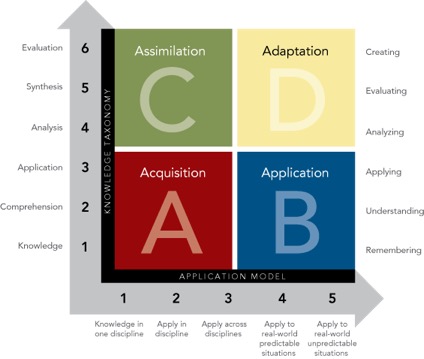
media video by using an app. Daggett (2014) helped transform the SAMR in to the
Rigor/Relevance Framework. The framework is a two-dimensional framework based
on higher standards and student achievement.
The four quadrants focus on rigor and relevance to students
learning. The rigor side focuses on higher order thinking, while the relevance side
focuses on the real-world application. Combining the two dimensions together
helps educators produce the best learning experience for the students, which in
turn will produce higher achievement. As a librarian, the key to success of
integrating technology appropriately will be collaboration, which will also be
one of the biggest challenges. Working with teachers to create the best lesson to teach an objective while considering what the end product that is desired will be.
Then as the technology specialist for the campus I can make technology tool
suggestions that properly pair with the lessons objective and assessment needs. So, in conclusion
Media is not the message. Pedagogy is the main focus in education and media is
one of the tools that can be used to increase student achievement and higher-level
thinking skills. Keeping the focus of why we (educators) are doing what we are doing is
essential for continued growth in our schools and communities.
Reference
Common Sense Media. Introduction to SAMR model. Retrieved
from https://www.commonsensemedia.org/videos/introduction-to-the-samr-model#
Daggett, W. (2014). Rigor
/ relevance framework: a guide to focusing resources to increase student
performance. Retrieved from http://www.leadered.com/pdf/Rigor_Relevance_Framework_2014.pdf
Edutech Wiki. (2012). The
media debate. Retrieved from http://edutechwiki.unige.ch/en/The_media_debate
Sheninger, E. (April 25, 2016). Why pedagogy first, tech
second stance is key to the future. EdTech.
Retrieved from https://edtechmagazine.com/k12/article/2016/04/why-pedagogy-first-tech-second-stance-key-future
Sheninger, E. & Kieschnick, W. (May 6, 2016). How to
integrate Google apps with the rigor relevance framework. Ed Tech. Retrieved from https://edtechmagazine.com/k12/article/2016/05/how-integrate-google-apps-rigor-relevance-framework
Friday, July 21, 2017
Podcast
Podcasts are very popular today. I have investigated three different podcast programs on the computer I am going to discuss. All three podcast sites are easy to navigate and use. I started by creating a voice recording file on my computer to upload to the podcast site.
Now that you have three podcast resources to choose from: how might you incorporate podcasts into the classroom / library?
Audio resources are very popular with students. The hardest part would be creating an account and getting students started. A teacher or librarian can create a screencast explaining step by step how students can start creating podcasts for the classroom. I would set up a classroom account and make it private for student security. Make sure to follow your districts AUP. Classrooms and libraries can use podcasts in two different ways: as a way to get information (listening to others) and in away to share information (creating their own). When students create their own podcasts they are learning research skills, vocabulary skills, speaking skills, and problem solving skills (Eash, 2017).
Examples of ways podcasts can be incorporated into the school setting:
PodBean can be signed up for with Facebook, Twitter, or Email. I signed up using email. An email was supposed to get sent to my email address. I attempted multiple times to get the email sent to me so I could create my podcast. Unfortunately I was never able to get past that step. The site appears to be very straight forward and easy to upload a media file to add a podcast to your account.
PodOmatic
Very easy to get started and the user can choose to upload a file using Flash, HTML5 or Dropbox. The steps are very easy to follow to label, and describe your podcast. Unfortunately, I attempted multiple times to upload my voice recording and it was never successful.
Sound Cloud was very easy to get started. I went to upload a file. It took about 10 minutes to upload my file but it worked. Then I uploaded a picture that was from creative commons to go with my podcast. The podcast I created is for my prek students to use during workstations/centers. Prek students love to sing songs and do chants. I decided to create a podcast with a few favorite songs. That way the students can sing along and do the hand movements as they sing while they play it. I thought this would be a great way to incorporate podcasts with early childhood students. A teacher could also create podcasts with students singing the songs and put those on the playlist.
Now that you have three podcast resources to choose from: how might you incorporate podcasts into the classroom / library?
Audio resources are very popular with students. The hardest part would be creating an account and getting students started. A teacher or librarian can create a screencast explaining step by step how students can start creating podcasts for the classroom. I would set up a classroom account and make it private for student security. Make sure to follow your districts AUP. Classrooms and libraries can use podcasts in two different ways: as a way to get information (listening to others) and in away to share information (creating their own). When students create their own podcasts they are learning research skills, vocabulary skills, speaking skills, and problem solving skills (Eash, 2017).
Examples of ways podcasts can be incorporated into the school setting:
- Audio journaling
- Audio storytelling
- Current event discussions
- Informational / concept sharing recordings
- Creating persuasive arguments on issues
- Students could create podcasts on summaries of books they have read, then the librarian could attach a QR code to the summary and attach the code to the book for future students to use when selecting books in the library.
- Promoting library and school news
- 10 Podcasting Projects
When having students create a podcast have them follow the following steps to help them organize their information.
- Decide on the podcasting tool they want to use.
- Decide on the content they are going to research and share - writing a script/outline before recording/creating.
- Practice out loud, before recording/creating.
- Record/Create
- Test - Find someone to share it with and get feedback before publishing.
- Edit, if needed
- Publish
- Promote and Share
- Evaluate and learn from any mistakes for the next time.
Resources
Eash, E. K. (April, 2006). Podcasting 101 for K-12 librarians. Information today, inc. Retrieved from http://www.infotoday.com/cilmag/apr06/Eash.shtml
Gardner, T. Teaching with podcast. Read write think. Retrieved from http://www.readwritethink.org/professional-development/strategy-guides/teaching-with-podcasts-30109.html
Macpherson, E. (August 7, 2014). 10 podcasting projects teachers should try in the classroom. We are Teachers. Retrieved from https://www.weareteachers.com/10-podcasting-projects-teachers-should-try-in-the-classroom-2/
Saturday, July 15, 2017
Whatever After Series - Books 1-3
Book 1 - Whatever After: Fairest of All by Sarah Mlynowski
Abby and Jonah are siblings. They just moved to a new house. In the basement is a mirror. One night Jonah is exploring is knocks on the mirror it starts making noises. He goes to get his sister. He knocks three times and the mirror sucks them in. They land in the forest. Soon they realize they are in the fairy tale - Snow White. They keep Snow White eating the apple not realizing it changes her story. Abby and Jonah set out to help her have her happy ending. Soon they are on an adventure and realize time does not work the same way in the mirrors world as it does in the real world. One night in the real world is like several days in the mirror. Soon they make it home and Snow's story is fixed.
Book 2 - Whatever After: If the Shoe Fits by Sarah Mlynowski
Abby and Jonah are sucked back into the mirror for their second adventure. This time it is Cinderella's story. They change her story by have to help her fix it. They teach Cinderella how to make brownies that they call crownies. In the end lots of magic is used and they return home. Cinderella's story does not end the way you may think.
Book 3 - Whatever After: Sink or Swim by Sarah Mlynowski
The third adventure of the siblings takes them to the land of Mustard. Where they land in the ocean and realize they are in the story of the Little Mermaid. They are forced to have to help the Little Mermaid when she realizes she made a bad deal with the Sea Witch. Jonah and Abby have to swim in the deep ocean to try and save her. In the end the Little Mermaid is saved, but her story does not end the way you may think.
Where will book 4 take them?
Whatever After Discussion Questions from Scholastic
Sarah Mlynowski's website
Carve the Mark
Roth, V. (2017). Carve the mark. New York: Katherine Tegen Books.
The first book in a two book series from Veronica Roth the author of the Divergent Series. The new world she crafts in this book is unique and fascinating. While reading, the reader, is able to experience the growth and change of the two main characters. Akos is a simple boy who lives on one half of the planet occupied by the Thuvhe people. He has a fate from birth, but does not know what it is. His mother is an oracle and can see different versions of the future. He has a brother named Eijeh and a sister named Cisi both have fates also. One day they are all picked up at school by their father and taken home. They are meet by three Shotet soldiers in their house. The Shotet people are not like the Thuvhe people they are very aggressive and strong. The Shotet want Akos and the second born child of the family Kereseth. Their father is murdered in their home. Akos and Elijeh are taken to Shotet. Akos kills one of the soldiers on their way to Shotet. He earns his first mark on his arm. The Shotet people remember the people they kill by marking their arms so the person is always remembered. The leader of the Shotet is Ryzek Noavek. He wants Eijeh because he is fated to be an oracle. Akos learns he is fated to serve the Noavek family. He is sent to learn survival and military behaviors for two seasons. Then Ryzek makes him serve his sister Cyra. Cyra has the current gift that causes pain to herself and anyone who touches her. Akos has the current gift that anyone he touches puts their current gift to sleep basically. He brings relief and strength to Cyra. She has not been able to stand up to her brother until she spends time with Akos. Akos is set on saving his brother and escaping back to Thuvhe. Unfortunately he fails his first attempt and Ryzek uses his current gift on Eijeh. Trading good memories with painful memories. He breaks Eijah and starts to be able to get prophecies from him. The Shotet people one time a season go on a sojourn through space to scavenge another planet for their discarded goods. Akos experiences this adventure with Cyra. By the end of the journey both have learned new things about beliefs they had that makes their understanding of the world around them change. Cyra aligns herself with rebels. Eventually Akos makes it home with Cyra's help. But Akos is not okay being with out her or his brother. The Shotet attack Thuvhe and kidnap the sister of the chancellor. Akos reunites with his sister Cisi and meets the chancellor Isae Benesit. One of the Benesit' are fated to bring about the death of Ryzek, so he tries to change his fate with Eijah's help. Eventually Cyra, Akos and the renegades create a plan to murder Ryzek and try to save Isae's sister. The book ends with Ryzek death being faked, Eijah in a coma like trance and the renegades in space on their way to the Assembly Headquarters.
So much happens in this story, my summary does not do it justice. I like how Roth wrote the book alternating back and forth from the perspectives of Akos and Cyra.
Learn more about Veronica Roth at her official website.
Subscribe to:
Posts (Atom)